Business partner matching
When sending digital invoices, OCR documents, or transaction data into our platform, our system automatically maps incoming counterparty information (suppliers and customers) to existing connection (business partner) profiles.
This guide explains how our system handles record matching, deduplication, inbound/outbound logic, and auto-creation.
Throughout the guide, business partners will be referred to as connections.
Key identifiers & data hierarchy
Our platform evaluates incoming document counterparties using three primary attributes, ranked strictly by authority:
| Identifier type | Description | Examples | Authority level |
|---|---|---|---|
| Endpoint/Participant ID | Network delivery addresses (e.g., Peppol, e-invoicing networks). | 0225:452516362 | 1 (Highest/Primary) |
| National/VAT/Tax ID (ngid) | Legal registration or VAT identifiers. | FR51452516362 | 2 (Medium/Secondary) |
| Company name | Trade name or legal registered name. (Only in case no ID detected) | Acme Logistics SAS | 3 (Lowest/Fallback) |
Note: Contact attributes such as phone numbers and email addresses are treated as metadata only and are never used to establish a legal entity match.
What is a Participant ID?
A Participant ID is needed to route e-invoices correctly across electronic networks—just like a phone number is needed to send or receive a text message. Similar to an international country code, it uses a scheme prefix combined with a national business identifier to enable international routing:
Format: <Scheme Prefix>:<National Business ID>
Example: A French business with SIREN 123456789 has a Participant ID of 0225:123456789 (where 0225 represents the French e-address scheme prefix).
Inbound vs. outbound processing modes
The system evaluates incoming counterparty connections differently based on transaction direction (inbound or outbound):
| Processing mode | Scope | Rule summary |
|---|---|---|
| STRICT (We are Sender) | • Sales (Standard) • Purchases (Self-Billed) | If a Participant ID is present on the document but no active connection matches it, the matching pipeline terminates. No fallback to National/VAT/Tax ID or Name is performed. |
| LENIENT (We are Receiver) | • Purchases (Standard) • Sales (Self-Billed) | Match by Participant ID first. If that fails, try Tax/VAT ID (provided it doesn't conflict with another participant). If no IDs are present at all, fall back to Company Name. |
Resolution flow
The system evaluates incoming documents to correctly identify counterparties and link them to active connections. Depending on whether the document is processed under STRICT or LENIENT mode, the engine follows a structured lookup hierarchy—evaluating primary Participant IDs, secondary Tax IDs, and company names while applying conflict checks—to either link to an existing connection or trigger the creation of a new one.
See the key business rules.
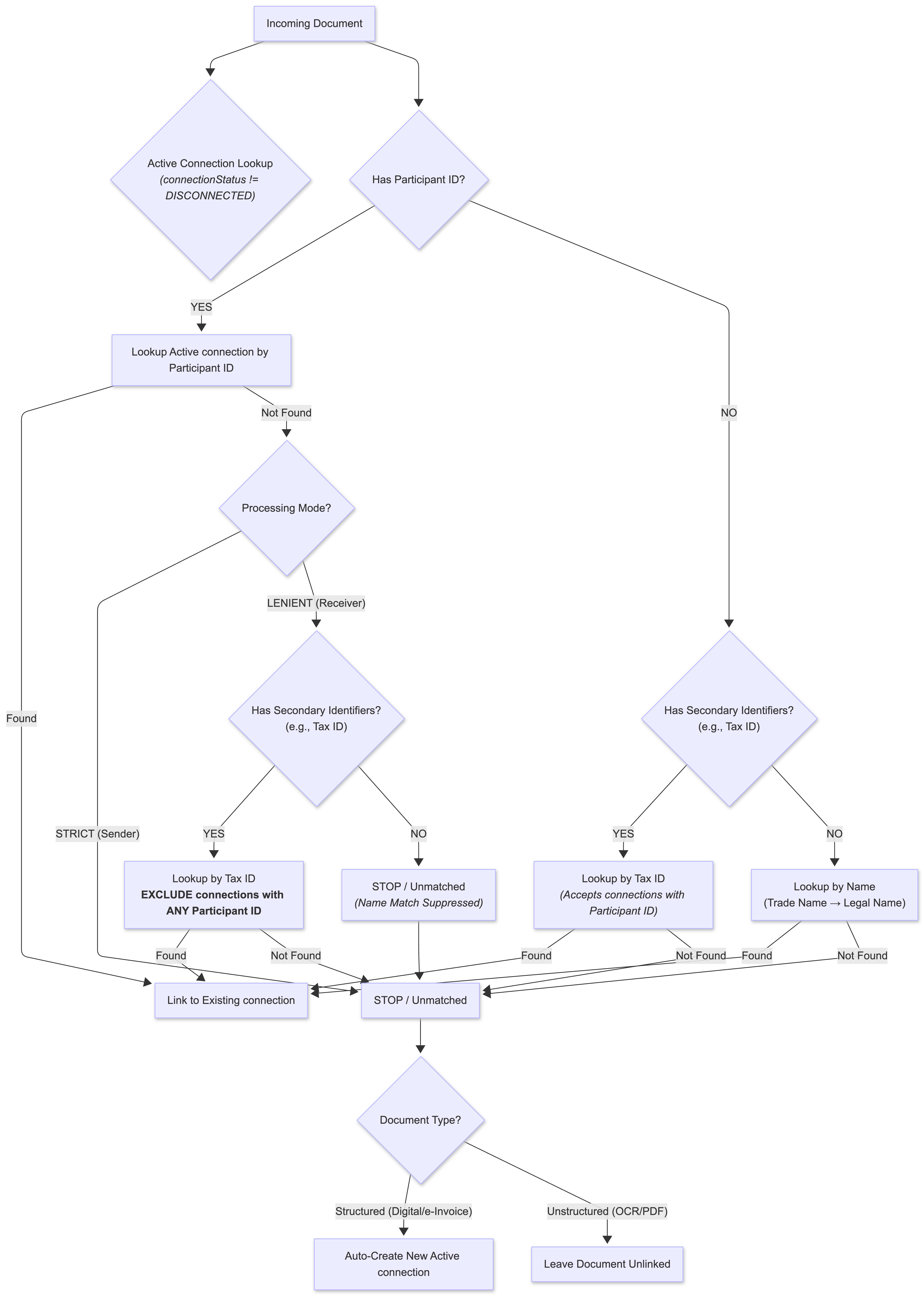
Key rules
Rule 1: Disconnected connection exclusion
Connections with connectionStatus = DISCONNECTED (soft-deleted/disconnected) are strictly filtered out during lookups.
- Structured documents: If the only matching connection is
DISCONNECTED, the platform creates a new active connection. A soft-deleted connection is treated as a retired entity, so creating a new active connection is intentional behavior. - Unstructured documents: Left unlinked without creating a new connection profile.
Rule 2: Strict name suppression on Participant ID
When a document counterparty contains a Participant ID, name-based matching is automatically disabled to prevent accidentally linking distinct legal entities with similar names. Name matching is permitted only as a last resort when no identifiers at all (such as a Participant ID, VAT, or Enterprise Number) can be extracted from the document, such as after an OCR failure; as soon as a single identifier is present, name matching is strictly forbidden in both strict and lenient modes. Note that contact details like phone numbers and email addresses are ignored entirely during this process and do not count as identifiers.
Rule 3: Conflict exclusion on secondary identifiers (LENIENT mode)
When falling back to National/VAT/Tax ID on an inbound document with an unmatched Participant ID, the engine excludes any connection that already has a different Participant ID populated. A shared secondary identifier must never link to a profile registered to a different network address.
Rule 4: Unfiltered secondary ID lookup (LENIENT mode)
When the incoming document does not contain a Participant ID, National/VAT/Tax ID matching considers all active connections, including those that have a Participant ID.
Workflow specifics
A. Purchase invoices (Standard/Inbound — LENIENT mode)
- Participant ID match: Searches active connections (
connectionStatus \!= DISCONNECTED). If matched $\rightarrow$ Link to connection. - National/VAT/Tax ID fallback: If the document contains a Participant ID, Tax ID fallback excludes connections that already have a differentParticipant ID.
- Name match: Performed only when the document contains neither a Participant ID nor a Tax ID (
ngid), or any other identifier, other than phone and email.
B. Sales digital invoices (Standard/Outbound — STRICT mode)
- Participant ID match: Searches only active connections (
connectionStatus \!= DISCONNECTED). If matched$\\rightarrow$Link to connection. - If no active connection matches the Participant ID, the matching pipeline terminates immediately. No National/VAT/Tax ID or Name lookup is performed.
- For structured documents, the document processing workflow then creates a new active connection.
C. Self-Billing documents
For self-billing flows, counterparty rules are inverted:
- Incoming Customer data is evaluated using Purchase (LENIENT) rules.
- Incoming Supplier data is evaluated using Sales (STRICT) rules.
Matching scenarios
Refer to this matrix to predict how document payloads will resolve in our system:
| Mode | Document payload | Database state | Action taken | Business reason |
|---|---|---|---|---|
| LENIENT (Purchase) | Tax ID: FR88450123977 Name: Air Flow SA | Active connection exists with Tax ID FR88450123977 | Links to active profile | Active connection matched cleanly via Tax ID. |
| LENIENT (Purchase) | Participant ID: 0088:6432109876543 | Disconnected connection with Participant ID 0088:6432109876543 | Creates new active connection | Disconnected connections are excluded from matching. For structured documents, a new active connection is created. |
| STRICT (Sales) | Participant ID: 9925:BE0475123459 Tax ID: BE0475123459 | Active connection with Tax ID BE0475123459 (No Participant ID on profile) | Creates new active connection | STRICT mode: Outbound documents with unmatched Participant IDs cannot fall back to secondary IDs. |
| LENIENT (Purchase) | Participant ID: 9915:NL854321098B02 Tax ID: NL854321098B02 | Active connection with Tax ID NL854321098B02 & Participant ID 9915:NL123456789B02 | Creates new active connection | Conflict exclusion: Secondary ID fallback excludes connections registered to a conflicting Participant ID (9915:NL123456789B01 $\neq$ 9915:NL854321098B01). |
| LENIENT (Purchase) | Participant ID: 0208:0412345677 Name: Pantharei | Active connection with Name Pantharei | Creates new active connection | Name suppression: Name lookup is strictly forbidden when a document contains a Participant ID. Since no active connection matches the Participant ID, a new active connection is created. |
| EITHER | No identifiers Name: Veloce Labs | Active connection with trade name Veloce Labs | Links to active profile | In the complete absence of formal IDs (e.g., after an OCR failure), falling back to name matching is allowed. |
Integration best practices
- Always provide the Participant ID: Whenever available, include the Participant ID, as it is the primary identifier used for connection matching and document routing.
- Always supply National/VAT/Tax IDs: To ensure maximum reconciliation accuracy, always include official Tax or Registration IDs in payload submissions.
- Rely on structured identifiers: Prefer structured identifiers (Participant ID and National/VAT/Tax ID) over company names for matching. Avoid relying on custom string manipulation or normalization of company names.
- Listen for partner creation events: If integrating via APIs or webhooks, subscribe to
business_partner.createdevents to capture newly created connections generated during document ingestion. - Account for soft-deleted connections: Structured documents received while the existing connection is
DISCONNECTEDwill intentionally result in the creation of a new active connection.